What is MCP? Glossary
Table of contents
What is MCP?
MCP (Model Context Protocol) is an open-source standard for connecting AI applications to external systems.
Think of MCP as a USB-C port for AI applications. Just as USB-C provides a standardized way to connect devices, MCP provides a standardized way to connect AI applications to external systems.
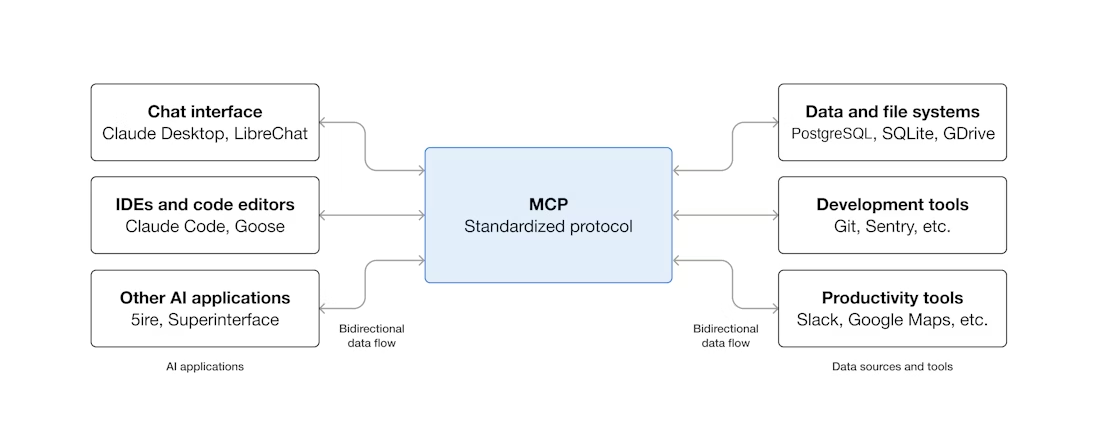
Learn more about MCP in the MCP documentation.
MCP Elements
An MCP server exposes four types of elements to AI applications. Each type has a distinct role:
Tools
MCP tools are actions that the AI application can execute on your store. They define what an AI can do: create a product, update an order, send an email, etc. If a specific action isn't predefined, the AI application won't be able to perform it.
Default tools
PrestaShop MCP Tools includes a growing set of generic tools that let you perform native PrestaShop actions, such as creating, retrieving and updating products, orders and customers.
3rd party tools
Beyond PrestaShop's default tools, your store may have additional actions available depending on the modules you've installed and whether they include their own tools.
Resources
MCP resources are read-only data that the AI application can access. They provide context to the AI without modifying anything in your store. For example: the product catalog, category list, store information, etc.
Unlike tools, resources are identified by a fixed URI (e.g. shop://catalog/products) and return structured data.
Resource Templates
Resource templates work like resources, but with a dynamic URI. They allow the AI to request specific data by providing parameters in the URI. For example: shop://orders/{orderId} lets you retrieve the details of a specific order by replacing {orderId} with the desired identifier.
Prompts
MCP prompts are predefined conversation templates that the AI application can use. They guide the AI in specific tasks with tailored instructions and context. For example: an "analyze orders" prompt that automatically structures the analysis according to a defined format.
Prompts can accept arguments to customize their behavior (e.g. filter by order status).
Visibility
You can see all available MCP elements (tools, resources, resource templates and prompts) in the Actions tab of your PrestaShop MCP Server or in your AI application after connecting to your server.
How it all works
The system consists of four key components:
- LLM (Large Language Model): The AI brain, like ChatGPT, Claude, or Gemini
- MCP Client: The interface in your AI application that connects to MCP servers
- MCP Server: The server running in your PrestaShop store (this is what you're installing)
- MCP Elements: The tools, resources, resource templates and prompts that the AI can use to interact with your store
Example workflow
- You ask ChatGPT: "Show me all products with low stock"
- ChatGPT's MCP Client connects to your store's MCP Server
- The MCP Server uses the appropriate resources and tools to query your products
- ChatGPT receives the data and presents it in a readable format